Matthew Teixeira
Founder, Isle Know · live at isleknow.com
MIS @ San Diego State · Graduating May 2027

I turn people’s problems into products they actually use.

I love solving people’s problems, and nothing beats seeing someone actually use what I built. I use AI as my build team, and I make the calls. Looking for product, program, AI enablement and analyst roles.

  • 161versions of Isle Know shipped in 10 days
  • ~15players use I’m Dinking! every day
  • 59%fewer answers needed on mastered sets, after I simulated 64 player runs
  • ~$5Min payments I process a year as an AP analyst

Selected work

Case studies

Selected work

Live web app · Oct 2026 – present · Founder

Isle Know

A 3D study game where right answers build your world

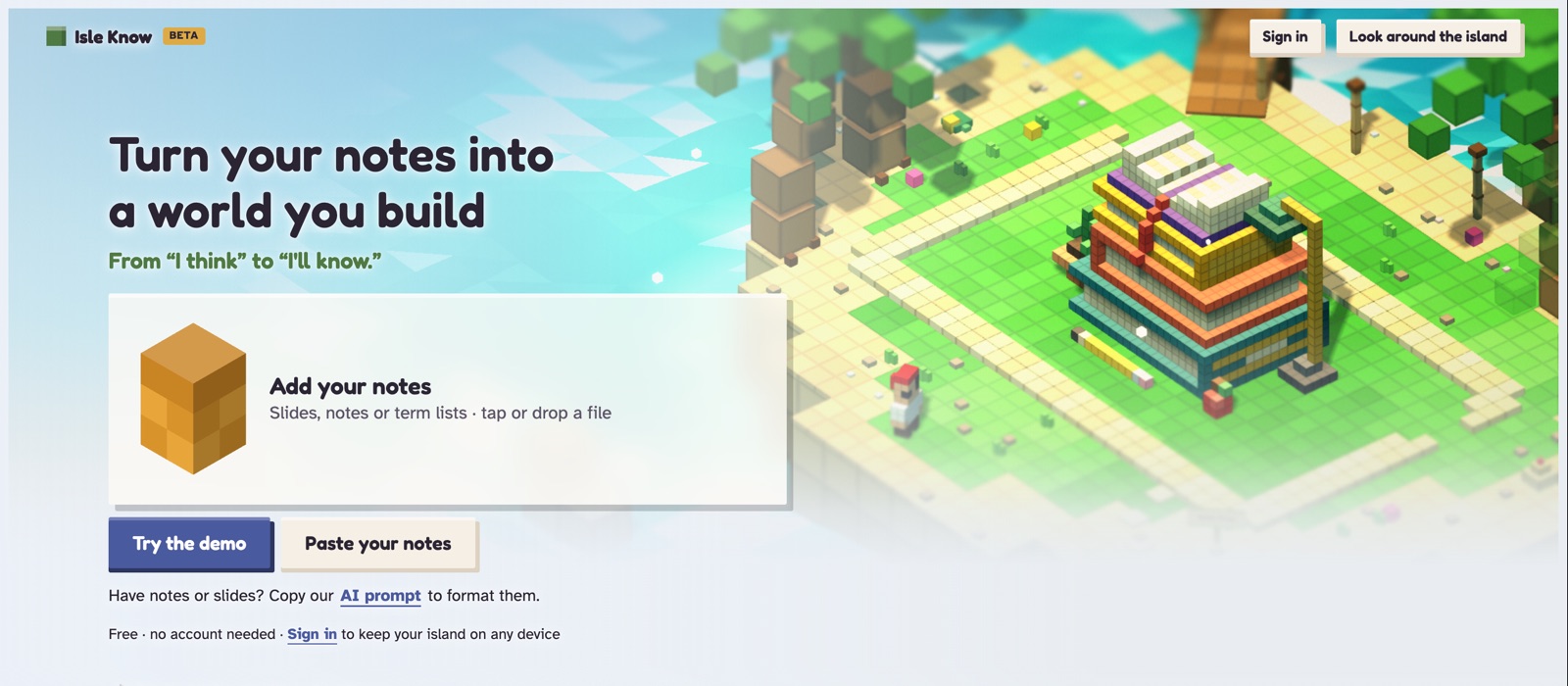
I’ve never been able to stay focused with basic, generic flashcard apps. They all feel the same: flip a card, tap next, and my mind drifts. So I built the study tool I actually wanted to open. Isle Know turns your own notes into quizzes, flashcards, and an “Explain it” mode, and right answers add blocks to your own 3D island. The last block of every build comes from explaining a concept in your own words.

I founded it, built it with a team of AI tools, and launched it myself. I invited about 20 student friends to beta test it in its first week.

Cinematic teaser · 34 seconds · sound is off, use the controls to turn it on

The problem

Most flashcard apps look and feel the same, and it’s easy to drift off and stop studying.

Why it matters

Students today grow up on screens that move, react, and reward them, and a static flashcard can’t compete for that attention. So I made studying a game: every right answer places a block on your own 3D island, so you can watch your progress build, and the last block needs a real explanation, not a lucky guess.

What I did

  • Founded and launched it in 10 days, across 161 versions
  • Invited about 20 students to beta test it in week one, and fixed their first bug report the same day
  • Added Google sign-in and cloud saves for students 13 and up, built around privacy
  • Closed two security holes before any user was affected
Read the full story

How it works
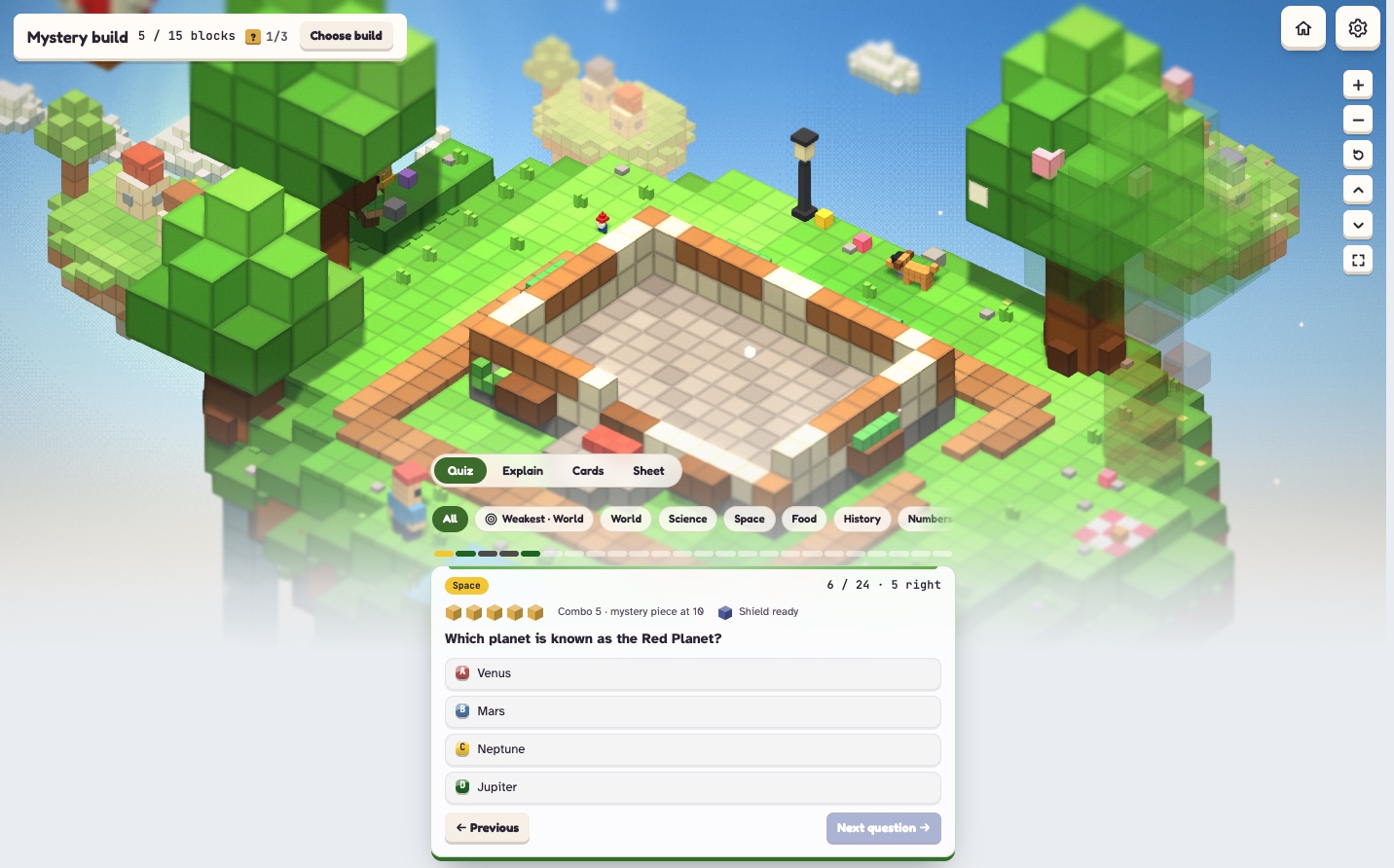
Isle Know quiz on a laptop: a voxel island being built above a question card asking which planet is known as the Red Planet, with four answer choices and Quiz, Explain, Cards and Sheet modesQuiz · right answers add blocks to the island
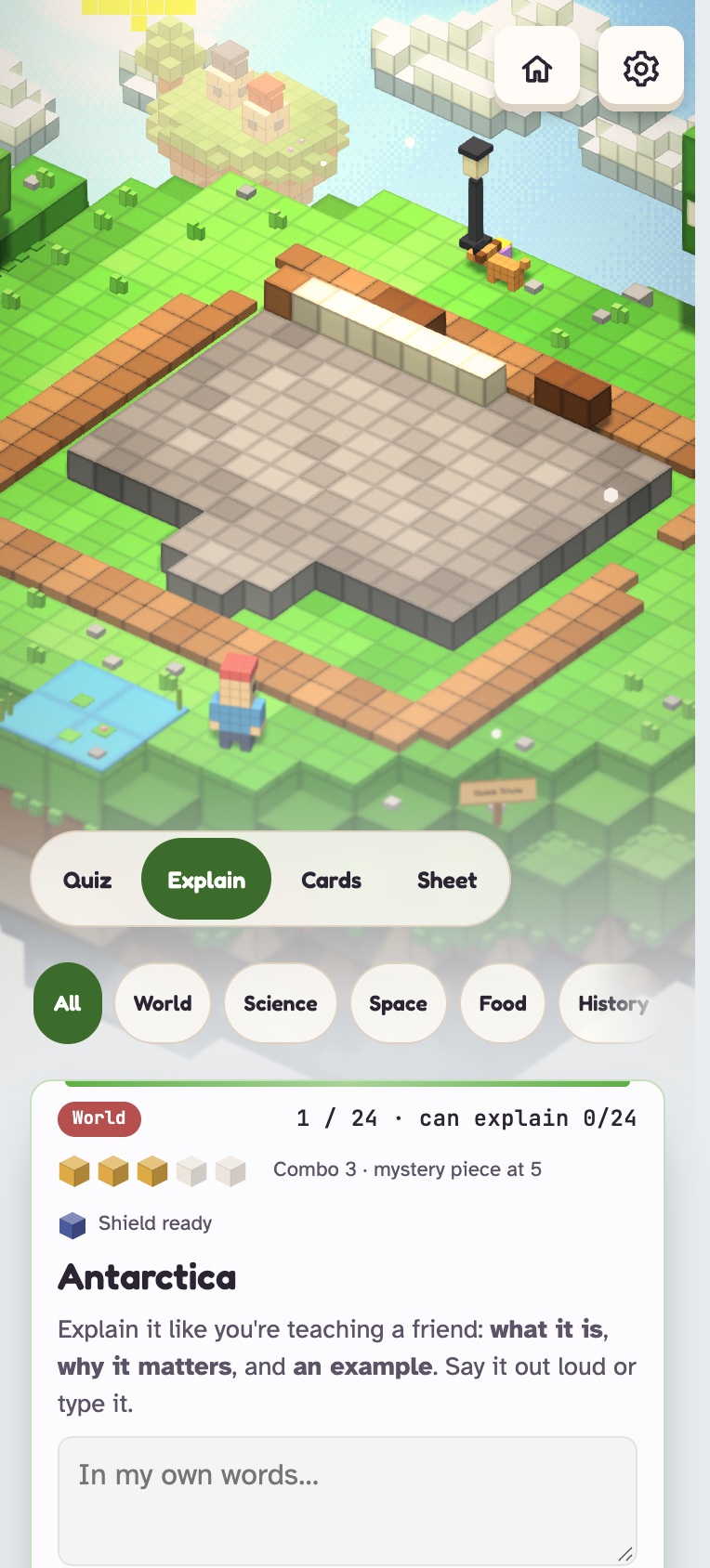
Isle Know Explain it mode on a phone: the island above a card that says explain it like you're teaching a friend, with a box for your own wordsExplain it on a phone · put the idea in your own words
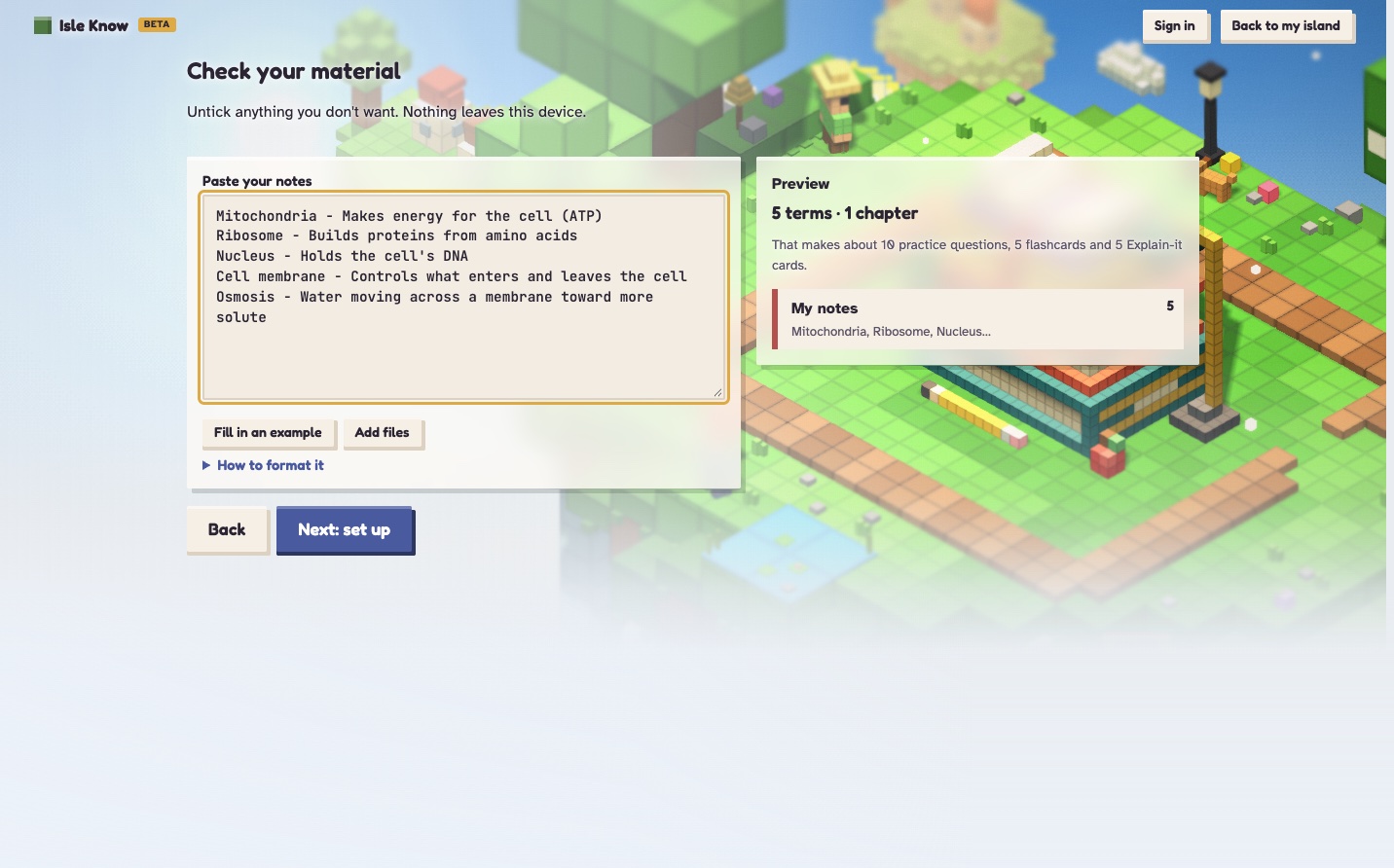
Isle Know Add your notes screen: pasted biology terms on the left and a live preview on the right showing 5 terms, about 10 practice questions, 5 flashcards and 5 Explain-it cardsAdd your notes · paste terms and see your study set before you start
Real screenshots from the live app. Tap any screenshot to open it full size.

One company, every job

  • Product & game designWhat to build, what to cut, and reward rules that pay for learning, not fast clicking.
  • Engineering leadDirected AI tools with set roles and one shared rulebook.
  • QA & securityA 43-test suite before every release, plus security reviews before and after launch.
  • Privacy & legal prepAn age check before sign-in, no ads and no tracking cookies (only anonymous daily counts), and privacy and terms written to match the app.
  • PricingBenchmarked 12 study and game apps; tips first, a paid plan only once there’s demand.
  • Brand & marketingThe name, the logo, and launch trailers rendered in the app’s own 3D engine.

How I ran a team of AI tools

Claude Code builds, Cursor reviews the code, and Grok runs overnight audits. One rule kept it safe: only one tool changes the app at a time, and nothing ships until I’ve reviewed it. Six AI reviews surfaced about 60 issues, and I checked each one against the code before fixing it.

What’s in it

  • Paste your notes and get quizzes, flashcards, a cheat sheet, and Explain it
  • 8 themed island worlds with day, evening and night
  • Google sign-in and cloud saves, or study as a guest with no account
  • Build sizes that scale from a quick session to a full exam

What broke, and how I fixed it

  1. My own reward rule backfired.A simulation of 64 player runs showed my anti-shortcut rule doubled the work for students who had already mastered a set.

    Fix: mastered sets pay again. Answers needed dropped from 34 to 14.

  2. A file name could take over an account.A security review found that a crafted file name inside a shared .zip could run code on the site.

    Fix: a one-word change, plus a test that plants hostile file names and fails without the fix.

  3. Browser extensions’ data ended up in accounts.After my first real sign-in, coupon and wallet extensions had written data that synced to my database.

    Fix: only Isle Know’s own data can ever sync, with a test that proves it.

  4. A tester’s MacBook cut off the question.A friend had to scroll to see the question. I measured 7 common laptop and tablet sizes, and it was below the edge on all 7.

    Fix: shipped a layout that fits at every size the same day, with a test for all 7.

What I learnedMy own assumptions were often wrong. The best fixes came from measuring and testing with real students, not guessing.

The research behind it

Isle Know is built on two of the best-supported findings in learning science: practicing recall beats rereading, and explaining ideas in your own words deepens learning. Game elements give a small boost on their own, so I use the island to show progress, not as the reason to study.

Sources: Adesope et al. (2017), a meta-analysis of practice testing · Bisra et al. (2018), a meta-analysis of self-explanation · Sailer & Homner (2020), a meta-analysis of gamification across 40 experiments. These back the ideas Isle Know is built on; Isle Know itself hasn’t been studied.

Built with JavaScript, Three.js, Web Audio, Supabase (Postgres), Google sign-in, Cloudflare, and a 43-test automated suite · Claude Code, Cursor, Grok.

Try Isle Know ↗
Live game · version 0.12.0, October 2026

Three to Zero

Co-op bomb-defusal web game for three players

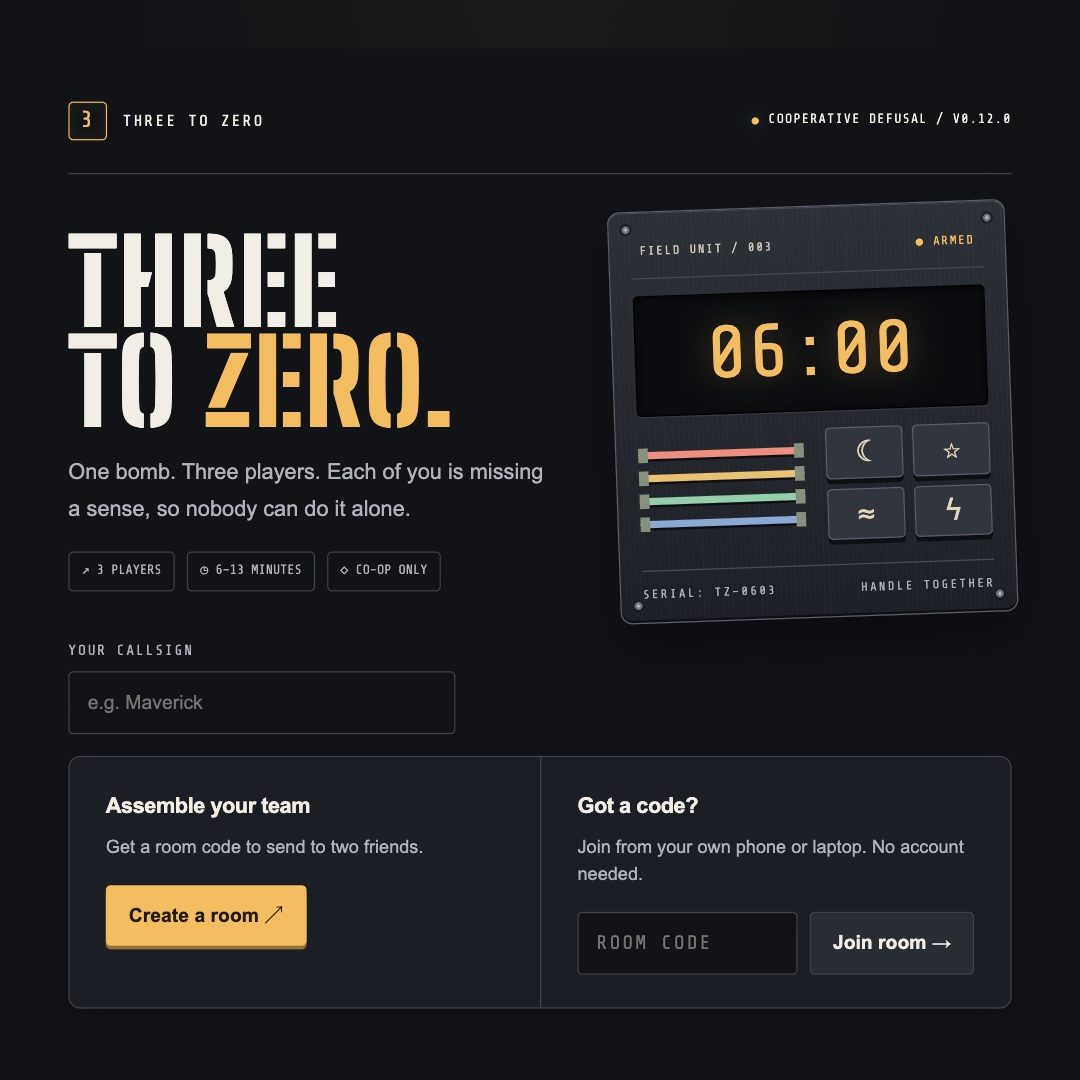
Three to Zero is a cooperative bomb-defusal game for exactly three players, each on their own device. Every role is missing a sense, so nobody wins alone, and the team gets one score.

Highlighted by Handshake’s President, Jonathan Stull, in his October 2026 post about AI Skills Studio. See the post ↗

Trailer · 25 seconds · press play

How it started

It began as Handshake’s AI Skills Studio “Create a Multiplayer Game” challenge. I fell in love with the process of building it and kept going.

The design challenge

Nobody can win alone, so every screen has to make communicating easy, especially on a phone.

What I improved

  • Moved Create a room from about 1.6 phone screens down to the first screen
  • Pinned each role’s key controls on screen so players stop losing their place mid-mission
  • Turned the Defuser’s view into one bomb with a light per module, so progress is always visible
Read the full story

How the three roles work

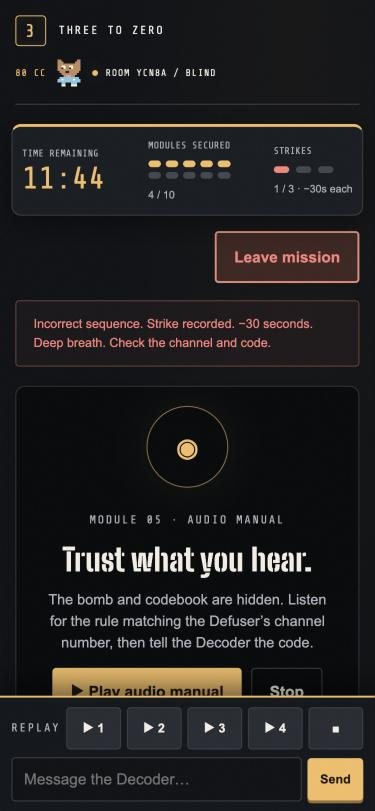
  • The GuideHears an audio manual but can’t see the bomb.
  • The DefuserSees the bomb but can’t hear.
  • The DecoderHolds the codebook but can only answer with hand gestures.
The Guide's phone screen: an audio manual to play, no bomb visible, and message controls pinned to the bottomThe Guide on a phone
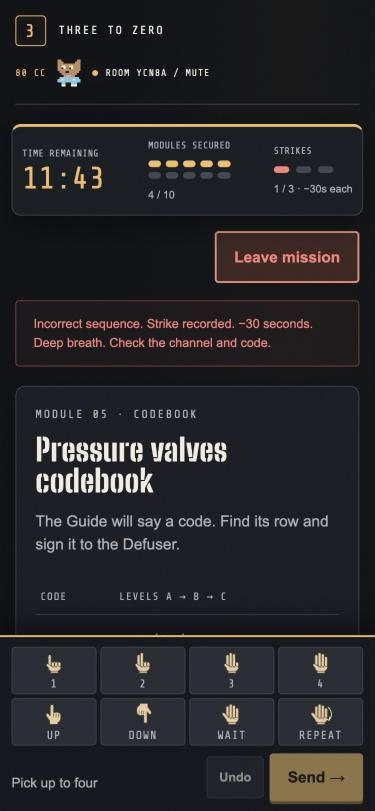
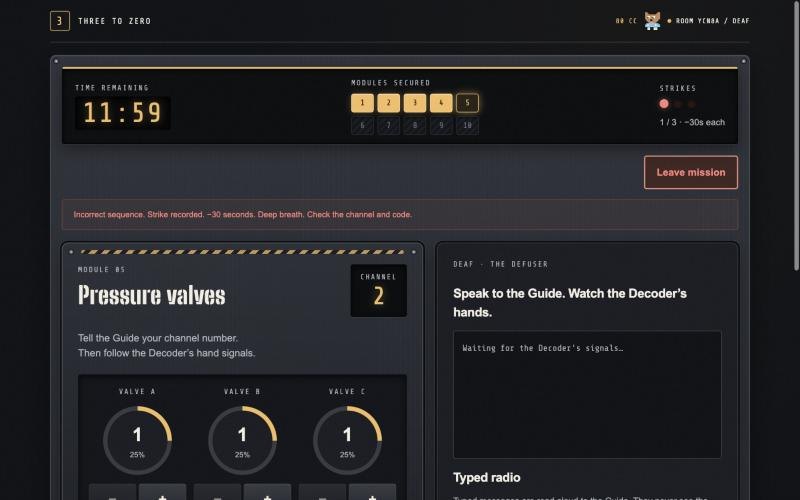
The Defuser's laptop screen: the Pressure valves module on channel 2, with ten numbered boxes across the top showing four modules securedThe Defuser on a laptop
The Decoder's phone screen: the codebook and hand-gesture buttons pinned to the bottomThe Decoder on a phone
One mission, three screens. The Defuser’s ten boxes are the whole mission as one bomb, one light per module. On phones, each role’s controls stay pinned to the bottom.

My role

I built the first version with ChatGPT and later versions with Claude as my coding partner. I made the product and design decisions, wrote the requirements, and playtested. I reviewed every change as a preview with screenshots at phone and laptop sizes before approving it to go live.

What’s in it

  • 10 puzzle module types, combined into missions of 3 to 10 modules graded on time and mistakes
  • Public lobbies and leaderboards for finding a team and comparing scores
  • Pixel-art avatars with emotes and a cosmetic shop
  • Phone layouts built for each role
What I learnedPassing tests tells you it works. Only playing it tells you whether it’s fun. Every change passed its automated checks, but I still played it before approving it.

Built with JavaScript, HTML and CSS on Vite, a single Netlify Function with Netlify Blobs storage, browser speech and Web Audio, and 132 automated tests.

Play it ↗

Personal project · Oct 2026 – present

I’m Dinking!

Live court check-in app for open-play pickleball

I’m a regular at Pacific Beach open play, so I built the app my group chat needed.

Promo video · 20 seconds · press play

The problem

My open-play group kept asking the same three questions in the group chat: who’s at the courts, how many paddles are in the rack, and how long the wait is.

Why it matters

Open play runs on guesswork. A live board shows who’s at the courts and how long the wait is on every phone. About 15 players now check in every day.

What I improved

  • Real-time sync, so every phone sees the same courts
  • A unique ID for every player, so wins never get mixed up
  • A capped activity log, so syncing can’t break at 300 entries
  • An AI code audit, shipped in small checkpointed batches
Read the full story

What it does

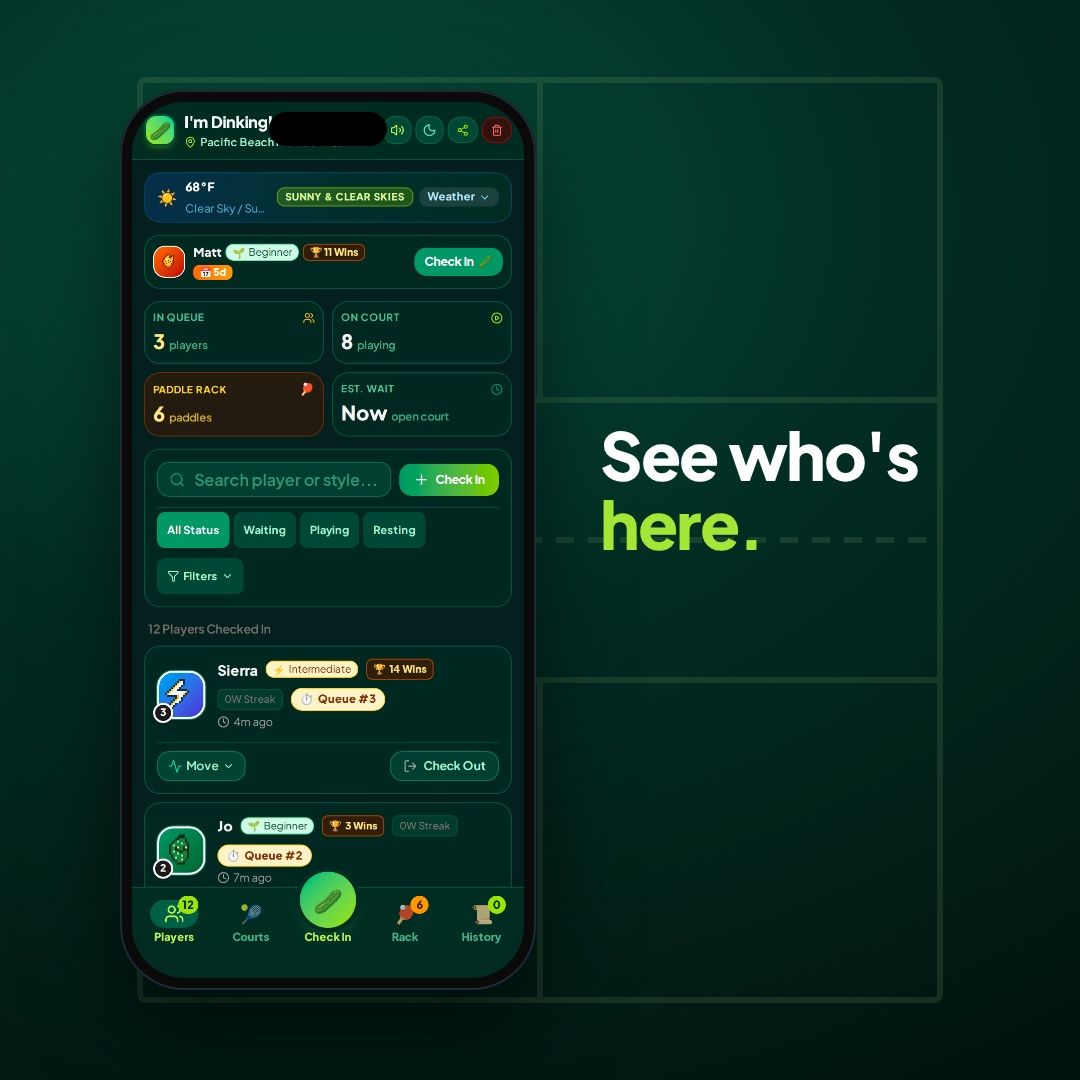
  • Shows who’s at the courts at a Pacific Beach rec center, live on every phone
  • Lets players check in from their own phones
  • Tracks the paddle line so everyone knows the wait
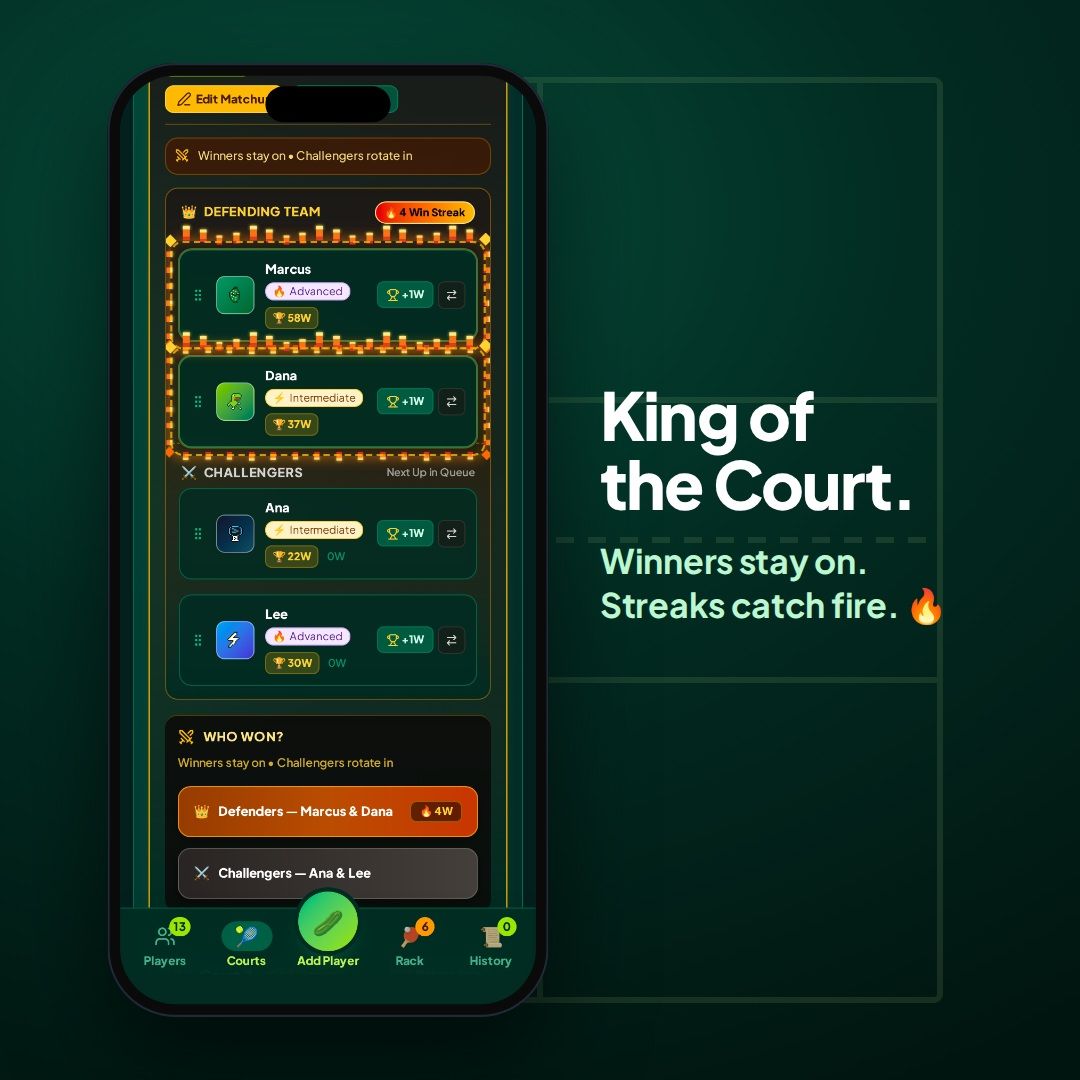
  • Runs King of the Court with win streaks

My role

I built it for Handshake AI Skills Studio’s “Vibe Code an App” mission. I made the product decisions and tested everything myself. I built it in Google AI Studio with Gemini and brought in ChatGPT and Claude for different jobs when I got stuck.

Inside the app

What broke, and how I fixed it

  1. It only worked on one phone.Every device saved its own copy of the courts, so my phone and laptop had no idea what the other was doing.

    Fix: moved shared data to Firestore so every phone sees the same board in real time.

  2. Players were getting mixed up.Two players with the same name shared one set of wins, every walk-on guest counted as the same person, and a brand-new phone could act like a sample player.

    Fix: every player gets their own ID; names are just labels.

  3. An AI “streamline” stripped out the app’s personality.It changed far more than I asked for.

    Fix: this time I had Claude audit the code, kept only the suggestions I agreed with, and shipped them in small batches with a GitHub checkpoint after each one.

  4. A sync failure waiting at entry 301.My own security rules cap the court’s activity log at 300 entries, but the app added an entry for every action and never removed old ones. At entry 301, every save would have failed. I caught it with a 200-player stress test and a review of my code against my rules, before any real player hit it.

    Fix: the app now keeps only the newest 250 entries, leaving 50 entries of headroom, and I verified the cap with a seeded 300-entry test.

What I learnedFinding those problems taught me more than building the features did.

Built with React, TypeScript, Firebase Cloud Firestore, Google AI Studio and Gemini, ChatGPT, Claude, and GitHub.

Open the app ↗

SDxSDSU Voice Agent Hackathon · Nov 2026 · team of 3

Lab Copilot

Voice AI lab partner for intro circuits labs

In a circuits lab, both hands are holding multimeter probes, so you can’t type or scroll the handout. In 6 hours, my team of 3 built a voice lab partner that walks you through an Ohm’s law lab and checks each spoken reading in under a second.

My part: I led product and build, tested the voice flow, and we demoed it live to industry judges.

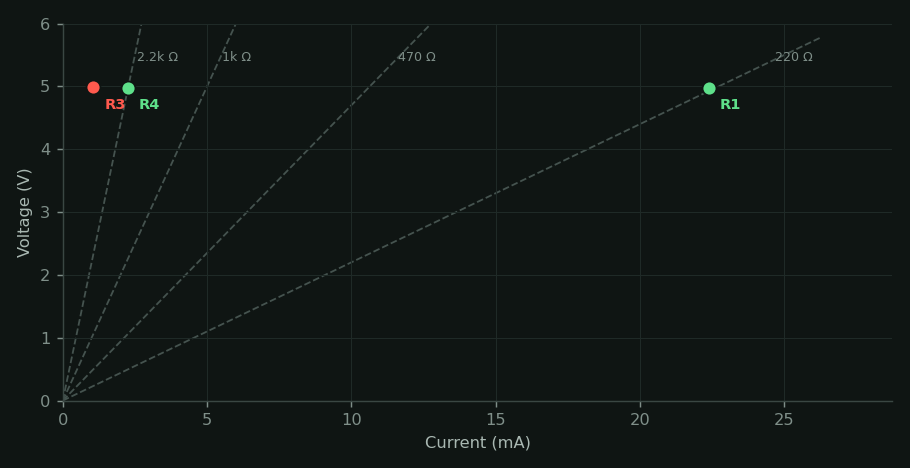
Voltage versus current chart from a real Lab Copilot run: three resistors on their expected lines and resistor 3 in red, far off its line
A real run from the hackathon: resistor 3 (red) read 4.71k instead of 1k, and Lab Copilot told the student which color bands to check.

Built with ElevenLabs Agents, a Daytona sandbox running Python on every reading, Node.js and Express · Claude Code wrote most of the code.

SDSU MIS 306 team project · Jan – May 2026 · Backend Lead Analyst

VitaAI

Agentic AI clinical documentation system (design)

Our five-person team designed VitaAI, an agentic AI system on AWS that turns spoken or typed notes into compliant charts, and presented it to 300 attendees at the SDSU MIS Showcase.

Result: a full system design I helped lead, including the 20 requirements I wrote and the security tier I co-designed.

The problem

Nurses spend about a third of their time on documentation (35% in a 36-hospital study of 767 nurses), more than on direct patient care (19%).

Why it matters

Drafting charts from a nurse’s own notes, with staff approving every one, could give that time back without taking people out of the loop.

What I added

  • Turned the goal into 20 requirements with measurable targets: drafts in 5 seconds, 99.9% uptime, 500 users at shift change
  • Co-designed the security tier so every request is checked at five points, from WAF to CloudTrail
  • Mapped Process 2 with its Level-1 DFD, use case, and activity diagram
Read the full story

Requirements with real targets

  • Fully HIPAA-compliant, with encryption everywhere
  • Drafted chart within 5 seconds
  • 99.9% uptime: care doesn’t stop at 5pm
  • Support up to 500 concurrent users at shift change
  • Every AI action and human override is logged

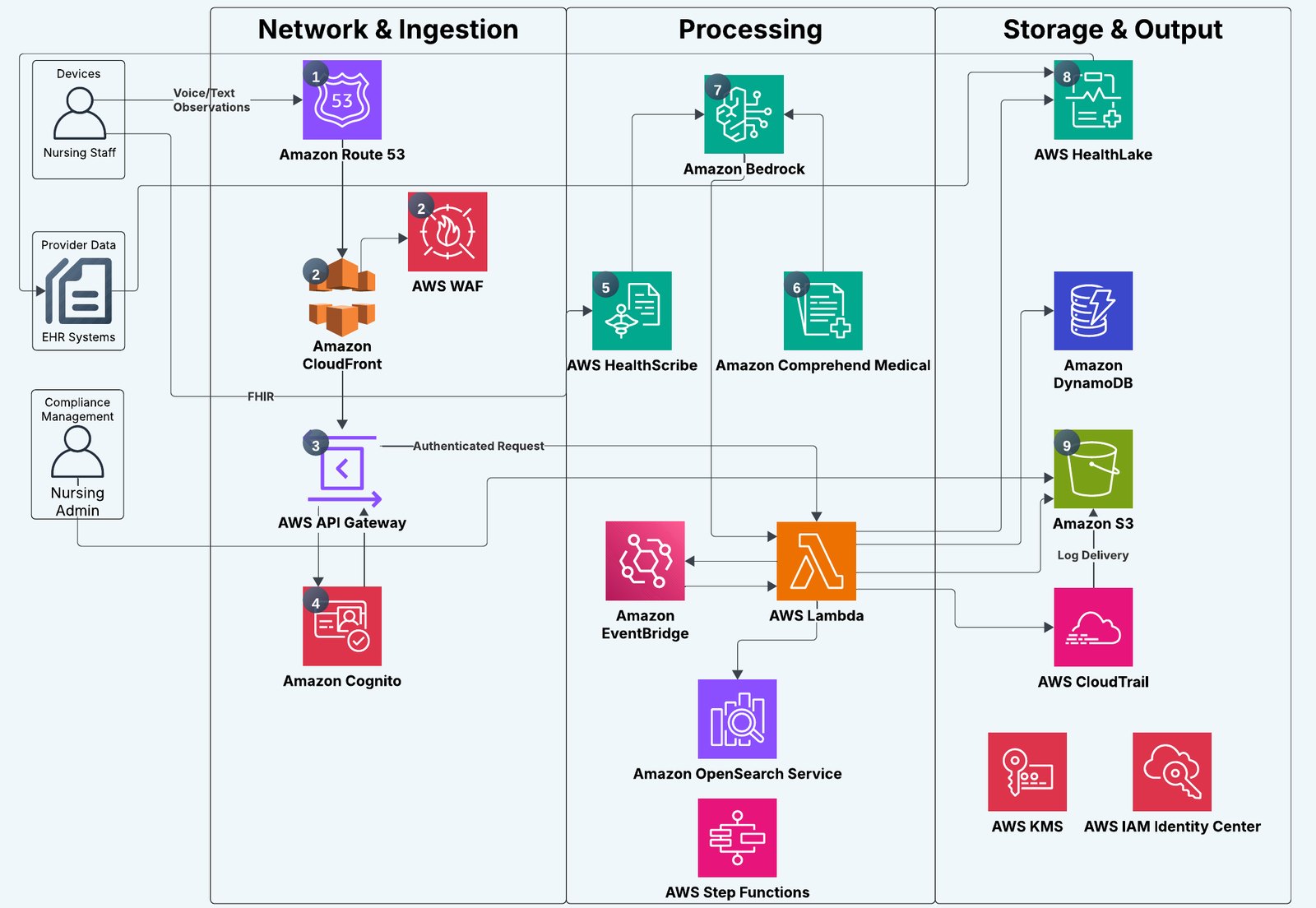
The architecture: 18 AWS services in three tiers

VitaAI AWS architecture in three tiers. Network and ingestion: Route 53, CloudFront, WAF, API Gateway, Cognito. Processing: HealthScribe, Comprehend Medical, Bedrock, Lambda, EventBridge, OpenSearch, Step Functions. Storage and output: HealthLake, DynamoDB, S3, CloudTrail, KMS, IAM Identity Center.
Our team’s architecture diagram from our presentation. I co-designed the security tier: WAF, Cognito, IAM, KMS, and CloudTrail. Tap to open full size.

How a request stays secure (the tier I co-designed)

  1. WAFBlocks SQL injection, XSS, and malformed requests
  2. CognitoMFA login; issues the token API Gateway checks
  3. IAMLeast-privilege roles for every Lambda
  4. KMSEncrypts data in HealthLake, DynamoDB, and S3
  5. CloudTrailImmutable audit log of every API call

Our team’s plan rolls out in three stages, from a 10–15 nurse pilot to a second facility. The rollout plan is my teammates’ work.

Skills Requirements, AWS architecture (18 services), HIPAA security, DFDs and use cases.

Team project. I only claim the sections the report credits to me: all 20 requirements, the security tier I co-designed, and my Process 2 diagrams and use case. Credit to my four teammates for the rest, including the rollout plan.

SDSU MIS 380 team project · Spring 2026

Hospital Management System

SQLite database and web reporting dashboard

A 14-table database that tracks a hospital’s patients, staff, appointments, medical records, prescriptions, billing, and supplies, with a web dashboard that runs any of 20 SQL reports from a dropdown.

My part: on a four-person team, I built most of it. Teammates made the ER and logical design diagrams.

Hospital Dashboard web page with a report dropdown set to Report 13, an inner join of three tables listing appointments with patient and doctor names
The dashboard running Report 13, a three-table join · sample data

The problem

Hospital staff need one place to record and find patient care information accurately.

Why it matters

Related tables with enforced rules cut duplicate data entry and prevent errors like double-booking a room or losing track of a patient’s allergies.

What I added

  • 10 indexes, each tied to a report it speeds up
  • A web dashboard that runs any of the 20 reports from a dropdown
  • 20 SQL reports, from aggregates and subqueries to outer joins, a self-join, and a UNION
  • The DDL and sample data for all 14 tables

Built with SQL and SQLite, plus a web dashboard for running the reports.

How I work

How I direct AI

AI can build fast, but noticing what feels off is still my job. These are the rules I work by, and where each one came from.

  1. Own the idea. Use AI to get it moving. The concepts are mine. I write the requirements and talk through with AI how to build them.

    Where it came from: Three to Zero’s three missing-sense roles and I’m Dinking!’s check-in board, paddle line, and King of the Court were my ideas. AI helped me build them, not come up with them. Three to Zero ↓

  2. Give each AI one job, and check its work. Only one tool changes the app at a time, and every finding gets verified before I act on it.

    Where it came from: on Isle Know, Claude Code builds, Cursor reviews the code, and Grok runs overnight audits. Cursor’s first review flagged 10 issues; I checked each against the code, and 9 were real. Isle Know ↓

  3. Review every change like a release. Nothing goes live until I’ve seen it.

    Where it came from: every Three to Zero change came to me as a preview with screenshots at phone and laptop sizes, and I approved each one before it went live. Three to Zero ↓

  4. Try to break it before users do. Passing tests isn’t the same as working.

    Where it came from: a 200-player stress test caught I’m Dinking!’s 300-entry sync limit before any real player hit it. In Three to Zero, changes that passed all 132 automated tests still got played before I approved them. I’m Dinking! ↓

  5. Small batches, with checkpoints. So one bad change never takes the whole app down.

    Where it came from: one AI “streamline” changed far too much of I’m Dinking!. Now I have Claude audit the code, keep only the suggestions I agree with, and ship them in small batches with a GitHub checkpoint after each. I’m Dinking! ↓

  6. My toolkit
    • Claude
    • Claude Code
    • Cursor
    • Grok
    • ChatGPT
    • Gemini in Google AI Studio
    • Claude Projects
    • Custom GPTs
    • Gemini Gems
    • GitHub

About

Beyond the projects

Why I build

I love solving people’s problems, and nothing beats seeing someone actually use what I built. What keeps me hooked is that there’s never just one right answer. There are a dozen ways to solve a problem, and I love the creative process of finding the best one. On Isle Know, I watch where people get stuck and fix it: in one day I shipped three releases that came straight from that. Next, I’m working on helping people get better with AI: most people still use it like a search engine and never see what it can really do.

Accounts Payable Analyst

Kimball, Tirey & St. John LLP · Mar 2024 – present. I process about $5M a year in payments, code 50–75 invoices a week, and reconcile statements for about 15 vendors. It taught me that details and trust matter most when money moves.

Off the clock

I’m a scratch golfer, and I used to give private golf lessons to middle schoolers. I also play collegiate pickleball at a 5.0 level.